 ExitBRIEF
ExitBRIEF
A claim file, plain-English next steps checked against DVA, and a list of who you are waiting on. Free to start, no account.
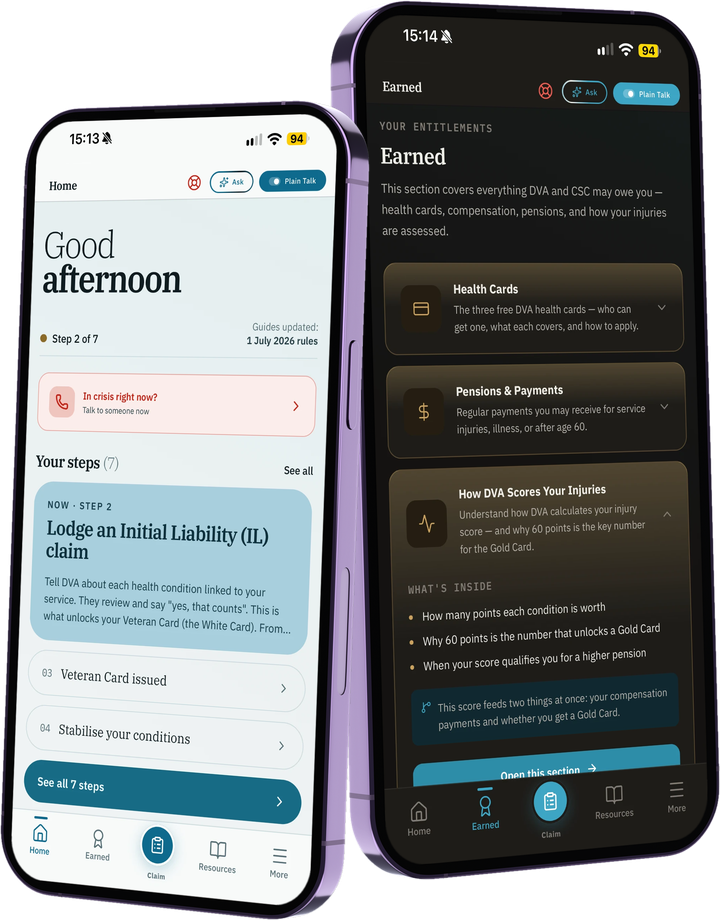
Your DVA claim in one place, kept on your phone, not scattered across email threads and paper folders.
ExitBrief keeps a claim file on your phone: your conditions, a dated timeline, and who you are waiting on. It tells you what comes next in plain English, checked against DVA’s own pages, and hands you a summary to send your advocate when you are ready. It never asks for your myGov or MyService login, and it takes no cut of anything you are awarded.
Your whole claim, in one file.
Your conditions, a dated timeline of what has happened, and your documents against each step. Names only, no medical detail stored, and kept on your phone, not on a server we run. Nothing to sign up for.
What comes next, in plain English.
Seven steps from records to the Gold Card pathway, written without the jargon, each marked with the date it was last checked against dva.gov.au. Your own letter always comes first, and the app says so.
Know who owes you what.
Note what you have asked for and who from. See how many days it has been, and send a polite follow-up in one tap. When it arrives, tick it off and it lands on your timeline.
A decision, a request, a setback.
Short guides for when DVA decides, asks for more information, or you cannot work. One works out your review window from the date on your letter. There is also a ready-made note to give your doctor that asks for what DVA asks of a diagnosis, and a claim pack to hand your advocate.
Always, from anywhere.
Support doesn’t sit in a menu. Emergency, Lifeline and Open Arms are on the Home screen and in the header of every screen, never more than one tap away.
Solo project. Made for the people who knew the system from the inside and got tired of pretending it was findable.